Model Trust and Data Routing
How LumaVista classifies your data by sensitivity and routes it to appropriately trusted AI models.


When you run a research project in LumaVista, your data passes through AI models for planning, searching, reasoning, and report writing. Not all AI models are equally trustworthy, and not all data is equally sensitive. A public web search result does not need the same protection as a credit card number that appeared in an uploaded document. LumaVista’s model trust and data routing system matches data sensitivity to model trustworthiness automatically — so sensitive content is never sent to a model that does not meet the required trust level.
The four trust tiers
Every AI model available in LumaVista is assigned to one of four trust tiers, based on where it runs and what data handling guarantees it provides:
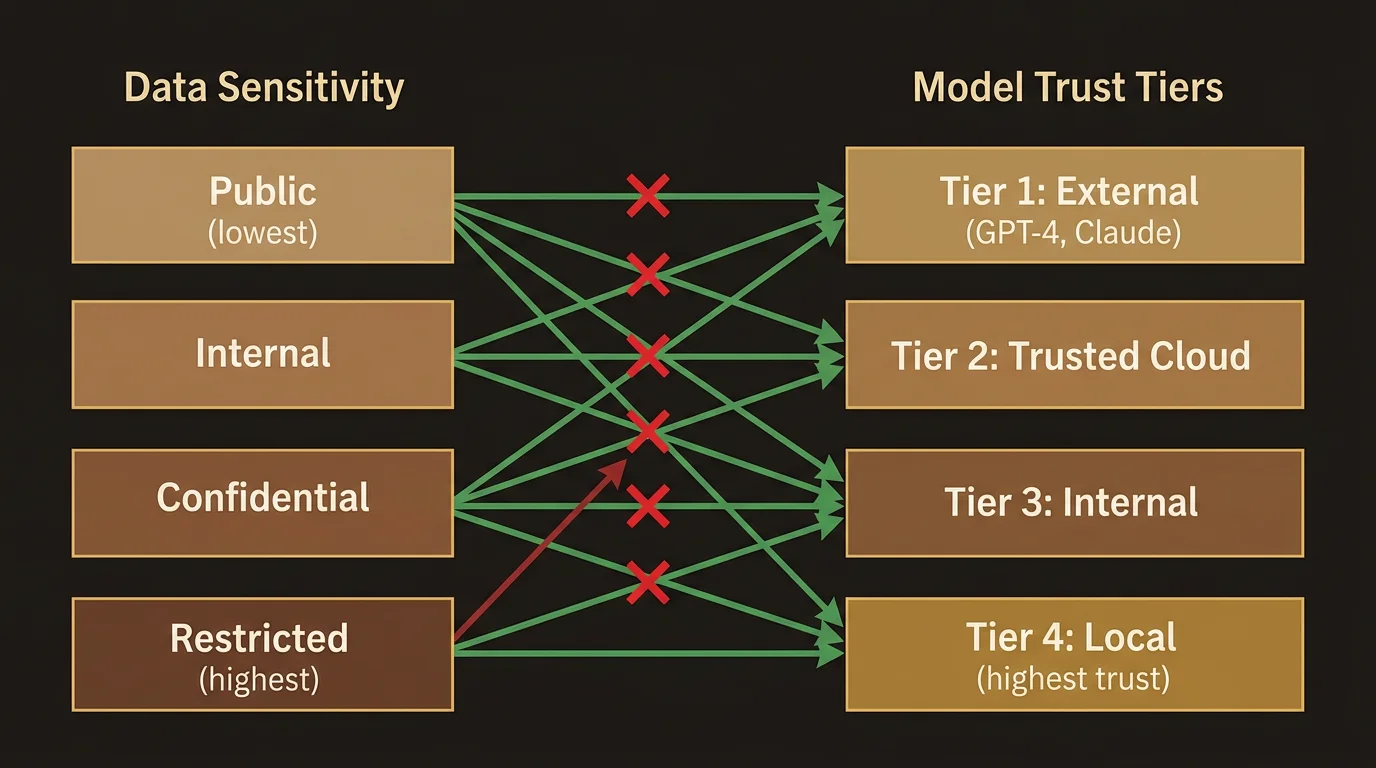
External (Tier 1)
Third-party AI providers with no specific data handling agreement. These models may use your data for training, may retain prompts and responses, and offer no contractual guarantees about data handling. They are suitable for processing public information — web search summaries, general knowledge, publicly available data — but nothing sensitive.
Trusted Cloud (Tier 2)
Cloud AI providers that have signed data processing agreements (DPAs), hold SOC 2 or equivalent certifications, and contractually commit to not training on your data. These models can handle moderately sensitive content like email addresses, phone numbers, and financial identifiers (IBAN numbers, VAT IDs), but not highly sensitive material like national identity numbers or health records.
Internal (Tier 3)
Models running on your organization’s own infrastructure — self-hosted LLMs deployed on company servers or private cloud instances. Because data never leaves your organization’s network boundary, these models can process more sensitive content including national identity numbers, passport data, and social security numbers. The trust level reflects that your organization controls the hardware and the data lifecycle.
Local (Tier 4)
Models running directly on your own hardware — your laptop, your workstation, your phone. Data processed by local models never leaves your device. This is the highest trust tier, appropriate for the most sensitive content: API keys, private cryptographic keys, health records, and any data classified at the highest clearance level.
How data sensitivity maps to trust tiers
The core security rule is simple: a model’s trust tier must be equal to or higher than the data’s clearance level. A model at Tier 2 (Trusted Cloud) can process data classified at Tier 1 (External) or Tier 2 (Cloud), but not data classified at Tier 3 (Internal) or Tier 4 (Local).
Here is how the mapping works in practice:
| Data clearance | What it covers | Minimum model tier |
|---|---|---|
| External | Public web content, general knowledge, published research | External (Tier 1) — any model |
| Cloud | Email addresses, phone numbers, IBAN numbers, VAT numbers, dates of birth, postal codes | Trusted Cloud (Tier 2) |
| Internal | National identity numbers (SSN, BSN, DNI, INSEE, etc.), passport numbers | Internal (Tier 3) |
| Local | API keys, private keys, connection strings, health records, passwords | Local (Tier 4) |
This mapping is enforced automatically. You do not need to manually tag your data or choose which model processes each piece of content. The classification engine scans content, assigns clearance levels, and the model resolver only considers models that meet or exceed the required trust tier.
The safety pipeline
Data flowing through LumaVista passes through a four-stage safety pipeline. Each stage serves a different purpose, and together they ensure that sensitive content is identified, handled, and controlled at every step.
Stage 1: Inbound filtering
Before any content enters the processing pipeline — whether it is a search result, an uploaded document, or a web page — it passes through an inbound filter. This filter inspects incoming content for:
-
Prompt injection attempts. Direct hijacking (“ignore previous instructions”), indirect techniques (zero-width character smuggling, base64-encoded instruction blocks, HTML comment injections), and role-play hijack attempts. Detected injections are blocked before they reach any AI model.
-
Content integrity threats. XML entity expansion attacks (billion laughs), deeply nested JSON structures designed to cause parsing issues, oversized payloads, and binary content disguised as text. These are blocked or flagged before processing.
-
Malicious URLs. Image markdown pointing to external tracking pixels, JavaScript injection URLs, data exfiltration patterns. Blocked at the boundary.
The inbound filter operates before classification — its job is to catch content that should never enter the system at all, regardless of sensitivity level.
Stage 2: Sensitivity classification
Content that passes the inbound filter is scanned by the classification engine. This is where the clearance levels described above are assigned. The classifier runs a library of pattern matchers across the content:
-
PII patterns with country-specific validators. Credit card numbers are validated with Luhn checksums (not just regex matches), so a random sequence of digits that happens to look like a credit card number is not misclassified. Dutch BSN numbers use the 11-check algorithm. Spanish DNI validates the letter suffix. IBAN numbers are checked against ISO 7064 mod-97. Each pattern is tuned to minimize false positives.
-
Secret patterns for known credential formats (AWS access keys, GitHub tokens, Stripe keys, JWTs, private key headers, connection strings) plus generic password detection.
-
Threat indicators for linguistic manipulation — clusters of extreme certainty language, emotional arousal terms, and persuasion techniques that might indicate manipulated content. These are flagged, not blocked, so you can make informed decisions about source reliability.
Each match produces a sensitivity tag with a confidence score, a byte-level span showing exactly where in the content the match was found, and the clearance level required. When multiple patterns match overlapping content, the highest-confidence match wins; if confidence is equal, the more restrictive clearance level wins. An aggregate risk score is computed using tiered escalation — a single API key (requiring Local clearance) is inherently scored higher than multiple email addresses (requiring Cloud clearance).
Stage 3: Model trust routing
With sensitivity tags attached, the model resolver selects which AI model will process the content. The resolver considers:
-
Trust tier compatibility. The model’s trust tier must meet or exceed the highest clearance level found in the content. If the content contains an API key (Local clearance), only a Local model can process it.
-
Model capabilities. Not every model is good at every task. The resolver filters by capability — reasoning, coding, analysis, summarization, extraction, planning, search, or general — to find models suited to the specific task.
-
Availability. Models that have recently failed or are experiencing rate limiting are temporarily marked unavailable. The resolver skips them and selects the next best option.
-
Cost. Among eligible models, the resolver considers cost tier and your budget settings to make efficient choices.
-
Your preferences. If you have enabled or disabled specific models, or set priority rankings, those preferences are applied as a final overlay.
The resolver works through these criteria in order, starting with the non-negotiable (trust tier compatibility) and proceeding to preferences. The result is that your data always goes to an appropriately trusted model, and within that constraint, you get the best model available for the task.
Stage 4: Outbound redaction
Before content is sent to an external AI model, a final outbound guard inspects the payload. If classified content with a clearance level higher than the target model’s trust tier is found — perhaps because new sensitive content was generated during processing, or because a classification was refined — the outbound guard redacts the sensitive spans.
Redaction replaces the sensitive content with placeholder tokens (e.g., [REDACTED:credit_card]) before the request leaves LumaVista’s boundary. The original unredacted content remains in your encrypted local database. The AI model receives only the redacted version, processes it, and returns a response that references the placeholders. The response is then reassembled with the original content on the server side.
This is a defense-in-depth measure. Under normal operation, the model resolver should never select a model that cannot handle the content’s clearance level. The outbound guard is there for the cases that slip through — edge cases, newly generated content, or classification refinements that happen mid-processing.
Configuring model preferences
While the trust tier system operates automatically, you have control over which models are available and how they are prioritized.
Enabling and disabling models
From Settings > Models, you can see all available models and their trust tiers. For each model, you can:
- Enable or disable it. Disabling a model removes it from consideration for all tasks. If you do not want your data processed by a specific provider, disable their models.
- Set priority. Among models that meet the trust and capability requirements, higher-priority models are selected first. If you prefer a specific model for its quality or speed, give it a higher priority.
Your preferences are stored in your personal encrypted database — they are part of your user data, not shared with other users or visible to us.
Enterprise model policies
Organizations can set model policies that apply across their team:
- Trust floor. Set a minimum trust tier for your organization. For example, setting a trust floor of Trusted Cloud (Tier 2) means no External models will ever be used, even for public content.
- Model allowlists and blocklists. Restrict which specific models are available to your team.
- Force-disable models. Prevent specific models from being used, regardless of individual user preferences.
Enterprise policies take precedence over individual preferences. If your organization has force-disabled a model, you cannot re-enable it from your personal settings.
The egress proxy
All outbound requests from LumaVista — whether to AI model providers, search engines, or web crawlers — pass through a centralized egress proxy. This proxy provides additional protections beyond the model trust routing:
-
SSRF prevention. Server-side request forgery protection validates all outbound URLs, pre-resolves DNS to prevent rebinding attacks, blocks requests to private IP ranges (RFC 1918, loopback, link-local, cloud metadata endpoints), and validates redirect chains. Internal services are allowlisted explicitly.
-
Response caching. Search results and web content are cached with configurable TTLs to reduce redundant external requests and improve performance.
-
Audit logging and metrics. Every outbound request is logged with its destination, timing, cache status, and attribution (which project and user triggered it). Prometheus metrics track request volumes, latencies, cache hit rates, and blocked requests.
The egress proxy operates transparently — you do not need to configure it. It is part of the infrastructure that ensures no outbound request bypasses the safety pipeline.
How this connects to your data protection
Model trust and data routing is one layer in LumaVista’s overall data protection architecture:
- Encryption protects your data at rest — see How Your Data Is Protected for the full encryption architecture.
- Data isolation ensures your data is physically separated from other users’ data.
- Classification identifies what is sensitive and assigns clearance levels.
- Trust routing (this page) ensures classified data reaches only appropriately trusted models.
- The companion app puts encryption keys on your device — see Setting Up the Companion App for step-by-step setup.
Together, these layers mean your sensitive data is identified automatically, routed carefully, and protected at every stage of processing.
For a high-level overview of LumaVista’s security commitments, visit the Security page. For deeper technical details on the classification engine and routing infrastructure, see the Security Architecture whitepaper.