How Your Data Is Protected
Device-controlled encryption, per-user data isolation, sensitivity classification, and what happens when you delete your account.

Your research data contains ideas, strategies, and information you would not share with just anyone. LumaVista is built on a simple principle: your data belongs to you, and the system should be designed so that even we cannot access it without your active participation. This page explains exactly how that works — from the encryption keys on your device to what happens when you decide to leave.
Encryption overview
LumaVista uses a layered encryption architecture where your device — not our servers — controls the keys that protect your data. Every piece of research data you create is encrypted at rest using industry-standard AES-256-GCM encryption. But what makes this different from typical cloud encryption is who holds the keys.
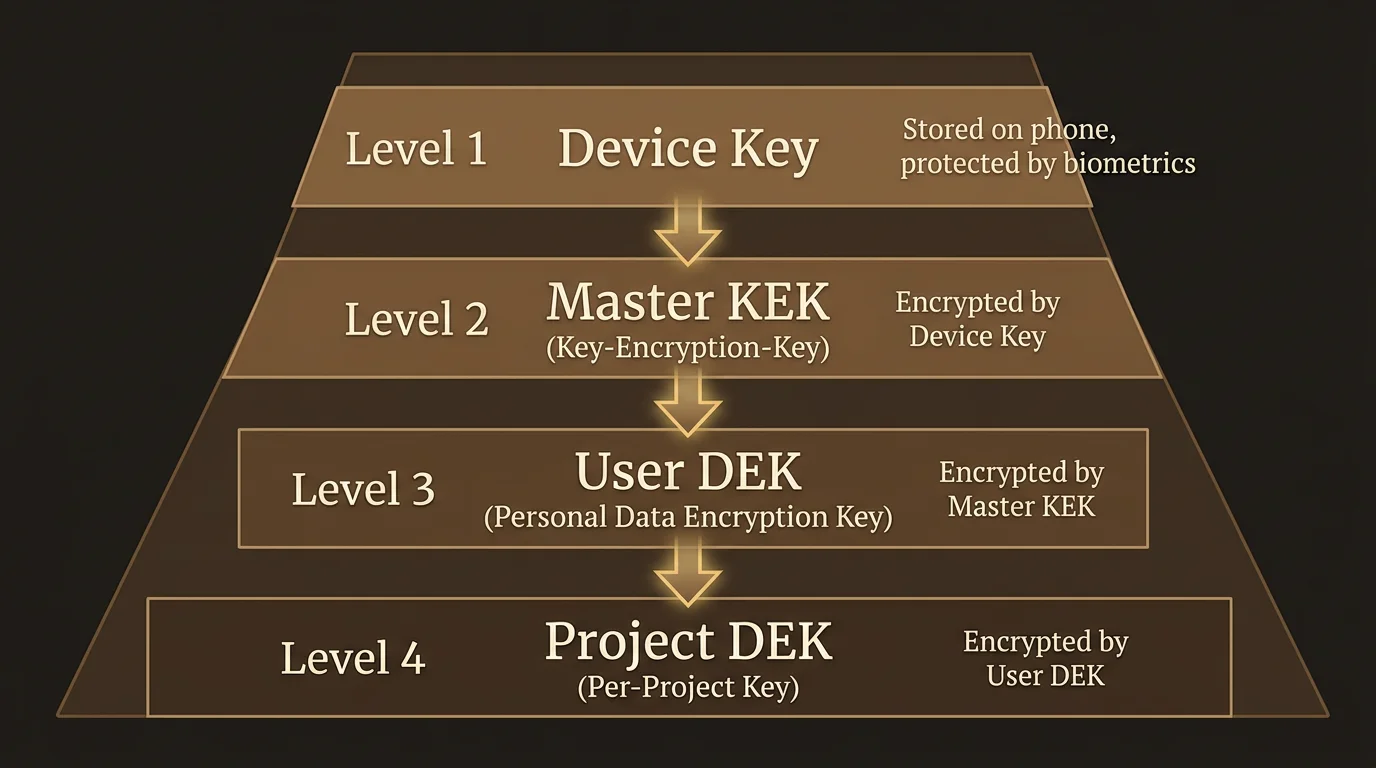
The key hierarchy
Your encryption is organized in four layers, each protecting the next:
Device Key — An X25519 asymmetric keypair generated on your phone or computer. The private half never leaves your device. On phones with a Secure Enclave (iOS) or Trusted Execution Environment (Android), the key is stored inside dedicated security hardware that even the operating system cannot extract it from. This is the same hardware protection used by Apple Pay and banking apps.
Master Key Encryption Key (Master KEK) — A 256-bit random key generated when you first set up encryption. This is the master key that protects everything else. It is never stored in the clear on our servers. Instead, it is encrypted (wrapped) to each of your enrolled devices using their Device Keys. Only a device you physically control can unwrap it.
User Data Encryption Key (User DEK) — An AES-256-GCM key that encrypts your personal databases: your settings, preferences, chat history, and memory (the entities and relationships LumaVista learns about your research interests over time). The User DEK is itself protected by the Master KEK.
Project Data Encryption Keys (Project DEKs) — Each research project gets its own AES-256-GCM key. This means individual projects can be managed independently — a foundation for future features like selective sharing, where you could give a collaborator access to one project without exposing everything else. Project DEKs are also protected by the Master KEK.
How a session works
When you open LumaVista and connect:
- Your browser or app establishes a secure WebSocket connection and authenticates.
- The server sends your device’s encrypted copy of the Master KEK.
- Your device decrypts the Master KEK using its Device Key (with biometric confirmation if you are using the companion app).
- The decrypted Master KEK is sent over the encrypted connection to the server.
- The server uses it to unlock your User DEK and open your encrypted databases.
- Your research data is available for the duration of your session.
When you disconnect — or if the server restarts — all key material is wiped from server memory. Your data on disk returns to being opaque ciphertext that nobody can read without your device.
Why this design
Most cloud services hold your encryption keys for you. That means they can decrypt your data whenever they choose — or whenever someone compels them to. With LumaVista’s device-controlled encryption, unlocking your data requires a device you physically possess. If you are not connected, your data is unreadable. Full stop.
Per-user data isolation
Beyond encryption, LumaVista enforces a strict physical separation of user data. Every user gets their own set of databases, stored in their own directory on disk.
Your data lives at data/<your-user-id>/ and consists of:
- settings.db — Your preferences, chat sessions, project index, and model configuration. Small, read-heavy.
- memory.db — The entities, topics, and relationships that LumaVista learns from your research. Can grow larger over time, write-heavy.
- projects/<project-id>/project.db — One database per project, containing your research graph, budget tracking, and runtime state.
This is not just a logical separation with different database tables sharing the same storage. These are physically separate databases in separate directories. There is no shared database that mixes your data with another user’s data.
What lives where
LumaVista uses three types of storage, each with clear boundaries:
| Storage | Contains | User data? |
|---|---|---|
Your Badger databases (data/<userID>/) | Research, memories, settings, projects | Yes — encrypted, fully yours |
| PostgreSQL | Authentication, profiles, subscriptions, device registry | Identity only — no research content |
| Redis | Session tokens, rate limits, real-time messaging | Never — ephemeral runtime state only |
The security invariant is straightforward: no user-generated content ever touches PostgreSQL or Redis. Your research, your memories, your chat history — all of it stays in your own encrypted database directory.
Database lifecycle
Your databases are not sitting open all the time. They follow a just-in-time lifecycle:
- Opened when you connect via an authenticated WebSocket session (your device provides the decryption key).
- Shared across multiple browser tabs from the same session (no duplicate key material in memory).
- Closed when your last connection disconnects. Key material is zeroed from memory.
- Project databases are opened on demand when you start a project and closed when it stops.
If the server restarts, all databases close and all keys are wiped. Your next connection re-authenticates and re-provides the key.
Automatic sensitivity classification
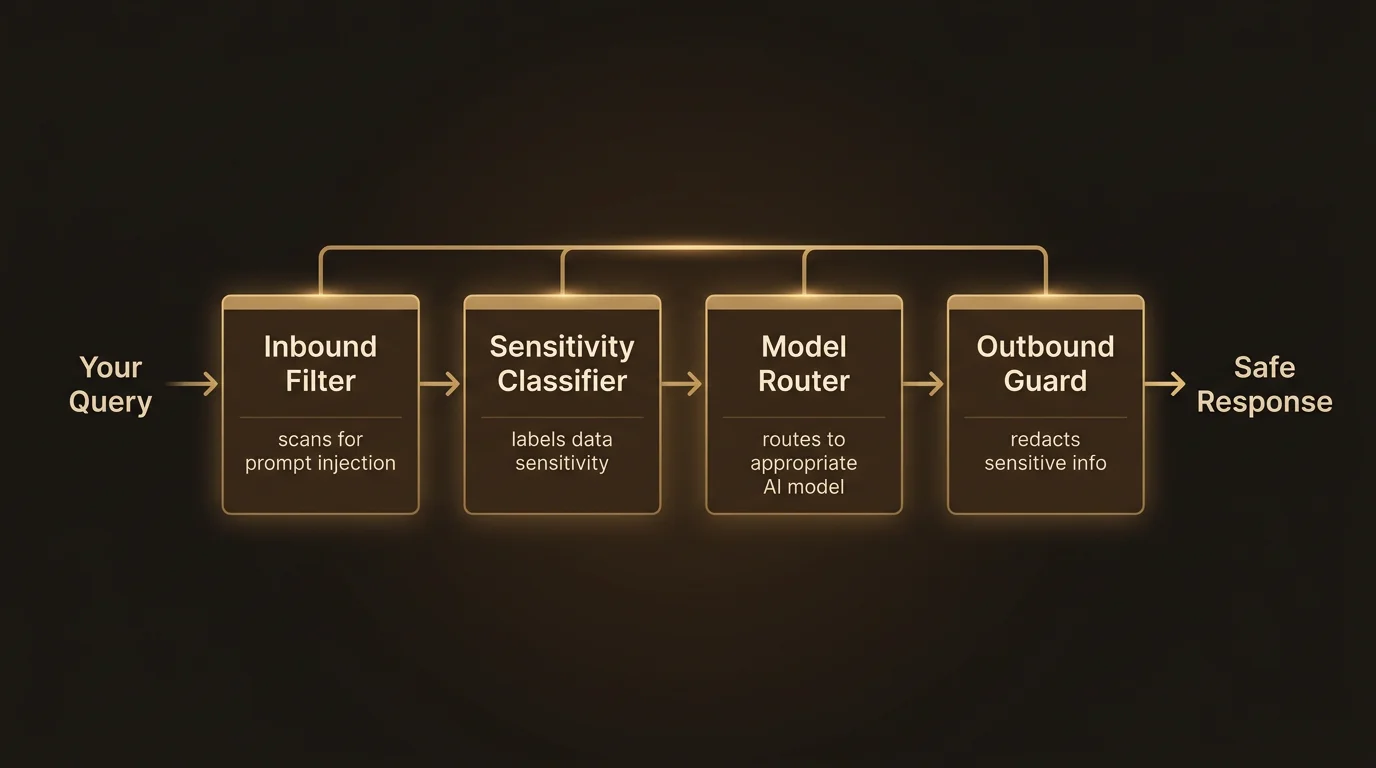
Not all data carries the same risk. An email address in a research note is less sensitive than a credit card number that accidentally ended up in a document you uploaded. LumaVista includes a built-in classification engine that automatically scans content and tags it by sensitivity level.
What gets classified
The classifier scans all content flowing through the system — your research inputs, search results, uploaded documents, AI responses — and identifies:
Personally identifiable information (PII): Credit card numbers (validated with Luhn checksums), bank account numbers, national identity numbers for EU member states (Dutch BSN, Spanish DNI, French INSEE, German Personalausweis, and others — each with country-specific validation), IBAN numbers, email addresses, phone numbers, passport numbers, dates of birth, and health-related data.
Secrets and credentials: API keys (AWS, GitHub, GitLab, Stripe, Slack, Azure, and generic patterns), JWT tokens, private keys, database connection strings, and passwords.
Threat indicators: Prompt injection attempts (both direct instruction hijacking and indirect techniques like zero-width character smuggling), malicious URL patterns, emotional manipulation language, and content designed to cause processing issues (XML entity expansion attacks, deeply nested JSON, oversized payloads).
How classification drives protection
Each piece of detected sensitive content is assigned a clearance level that determines which AI models are allowed to process it:
| Clearance | Examples | Can be sent to |
|---|---|---|
| External | Public web content, general knowledge | Any model |
| Cloud | Email addresses, phone numbers, IBAN numbers | Trusted cloud providers with data processing agreements |
| Internal | National IDs, passport numbers, SSNs | Models running on organizational infrastructure |
| Local | API keys, private keys, health data | Only models running on your own hardware |
This classification feeds directly into the model trust and data routing system, which ensures sensitive content is never sent to an AI provider that does not meet the required trust level. If content classified as “Internal” needs to be processed by an AI model, only models at the Internal or Local trust tier are eligible.
Enterprise custom rules
Organizations can define their own classification patterns. If your company has internal project codes, proprietary terminology, or industry-specific identifiers that should be treated as sensitive, you can add custom regex-based rules with your chosen clearance level. Custom rules go through a safety check to prevent catastrophic backtracking (a class of regex vulnerability), and they are scoped to your organization.
What happens when you delete your account
Account deletion in LumaVista is designed to be total and irreversible for your research data:
-
Your data directory is removed. The entire
data/<your-user-id>/directory — containing all your databases, all your projects, all your memories — is deleted. This is not a soft delete or a “mark as inactive.” It isrm -rfon the directory. The encrypted data and the wrapped encryption keys stored alongside it are gone. -
Your device registry is cleaned up. The PostgreSQL records linking your devices to your account are deleted via cascading foreign key constraints. No wrapped key blobs remain.
-
Your identity records are removed. Your authentication credentials, profile information, and subscription records in PostgreSQL are deleted.
-
Ephemeral state expires. Any session tokens or cache entries in Redis expire naturally (they have short time-to-live values by design).
Because your data was encrypted with keys derived from your devices, and because the wrapped key material is deleted alongside the data, there is no way to recover deleted data — even from backups. The encrypted data is meaningless without the keys, and the keys are gone.
GDPR compliance
This architecture is designed with GDPR’s “right to erasure” as a first-class requirement, not an afterthought. The per-user directory structure means deletion is a single filesystem operation with no risk of leaving orphaned data scattered across shared tables. Disk usage per user is trivially auditable (du -sh data/<userID>/), and the complete separation means one user’s deletion cannot possibly affect another user’s data.
No user data in central databases
It is worth stating this explicitly because it is a deliberate architectural choice: LumaVista maintains no central database containing user research data. There is no master index of your research topics. No aggregated analytics table built from your queries. No shared storage where a bug or breach could expose multiple users’ data at once.
PostgreSQL stores what it needs to for authentication and billing — your email, your hashed password, your subscription status. Redis handles ephemeral runtime coordination — session tokens, rate limits, real-time event channels. Neither contains anything you would recognize as “your data.”
This means a breach of the central PostgreSQL database would expose account metadata (email addresses, subscription tiers) but not a single research query, memory entity, or project result. A breach of Redis would expose session tokens (which are short-lived and can be invalidated) but no persistent user content.
How this connects
LumaVista’s data protection is not a single feature — it is a set of reinforcing layers:
- Encryption ensures data at rest is unreadable without your device.
- Isolation ensures your data is physically separated from every other user’s data.
- Classification ensures sensitive content is identified and handled appropriately.
- Trust routing ensures classified data only reaches AI models that meet the required trust level — see Model Trust and Data Routing for how this works.
- The companion app makes device-controlled encryption practical — see Setting Up the Companion App for installation and enrollment steps.
Together, these layers mean that protecting your data is not something you have to think about or configure. It happens automatically, by design, every time you use LumaVista.
For a high-level overview of LumaVista’s security commitments, visit the Security page. For implementation details on the encryption, isolation, and classification systems described above, see the Security Architecture whitepaper.