Guiding Your Research: Human-in-the-Loop
When to approve, reject, or batch-manage agent requests — and how to use Wrap It Up mode.


LumaVista’s agents are capable, but they are not autonomous — you stay in control. The Human-in-the-Loop (HITL) system gives you checkpoints during research execution where you can approve, reject, or redirect what the agents want to do next. This keeps you in the driver’s seat without requiring you to micromanage every step.
When does HITL activate?
HITL requests appear during project execution in several situations:
Expansion requests — When a planner wants to break a subtopic into further investigation, or when a search/reasoning node triggers post-execution expansion. The system asks you: should we go deeper here?
Budget extensions — When the project hits its node budget or depth limit but the agents have identified areas that need more investigation. The system asks: should we increase the budget or depth limit?
Tool authorization — When an agent needs permission to use a specific tool or access a particular resource. Less common, but important for maintaining control over what the agents can do.
These requests appear in the HITL panel in the project view. Each request shows what the agent wants to do, why it is requesting permission, and what the impact would be.
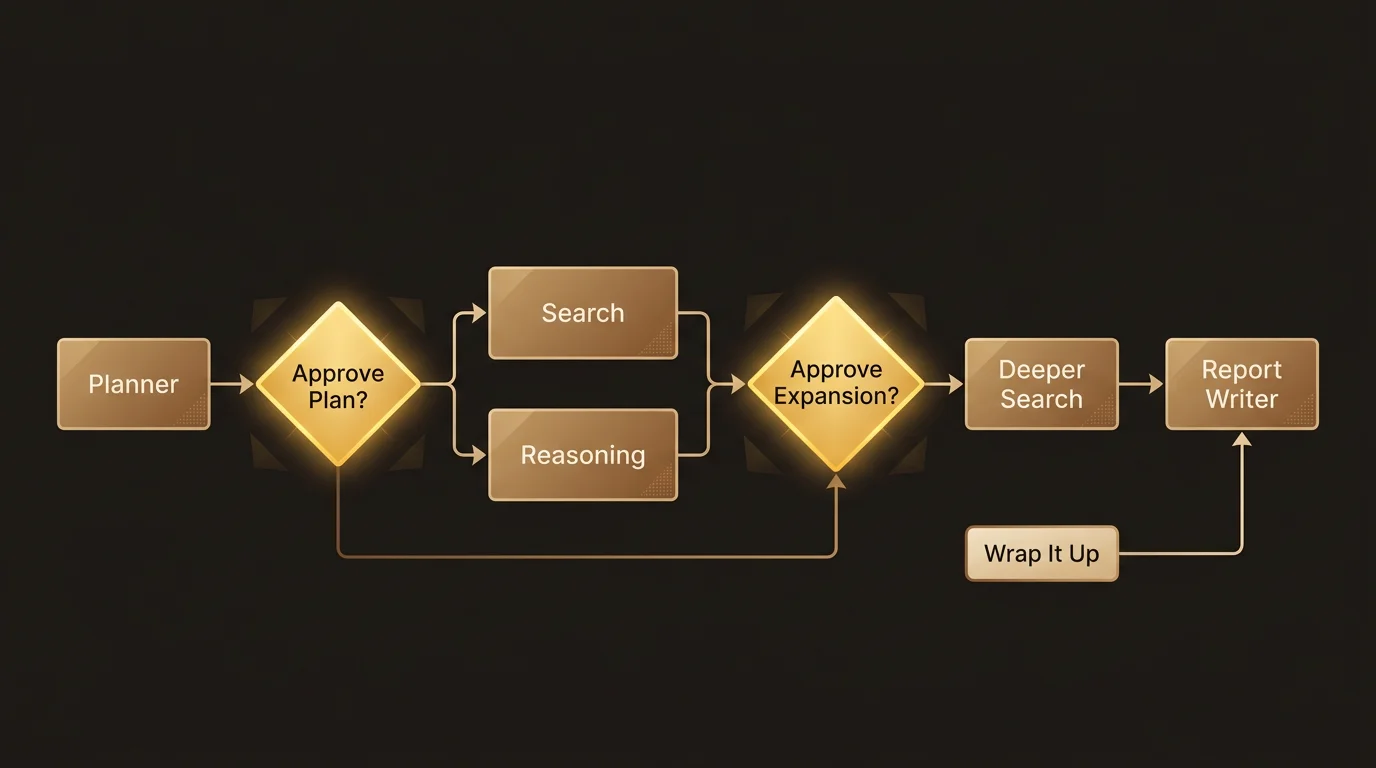
Responding to requests
For each HITL request, you have straightforward options:
Approve
Let the agent proceed. For expansion requests, this means new child nodes will be created and the research will go deeper into that subtopic. For budget extensions, this increases the project’s limits.
Approving is the right choice when:
- The subtopic is genuinely relevant to your research question.
- The budget increase is reasonable for the depth of research you want.
- You are early in the project and want comprehensive coverage.
Reject
Stop the agent from proceeding with that particular action. For expansion requests, the node completes with its current findings rather than expanding further. For budget extensions, the project works within its existing limits.
Rejecting is the right choice when:
- The subtopic is tangential to your actual question.
- The research is already deep enough in that area.
- You want to conserve budget for other parts of the research.
Rejecting does not cancel the project. It just tells that specific branch to wrap up with what it has. Other branches continue running normally.
Batch actions
When a project creates multiple HITL requests — especially during active expansion phases — handling them one by one gets tedious. Batch actions let you manage requests in groups.
The HITL panel groups pending requests by type:
Expansion requests — Grouped together with a Reject All button. Use this when you have seen enough expansion and want the project to finish with its current scope.
Budget requests — Also grouped with a Reject All button. Use this when you want the project to stay within its original limits.
Tool authorization — Grouped with both Approve All and Deny All buttons. Use Approve All when you trust the tools being requested; Deny All when you want agents to work without those tools.
Guidance and clarification requests cannot be batched because they require text input — you need to provide specific direction for each one.
Wrap It Up mode
Sometimes you reach a point where you have enough research and just want the project to finish. Instead of rejecting expansion requests one by one as they appear, you can activate Wrap It Up mode.
What it does
Wrap It Up sets a project-wide flag that immediately:
- Rejects all pending expansion and budget HITL requests — any requests currently waiting for your approval are auto-rejected.
- Auto-rejects all future expansion and budget requests — agents will not ask for further expansion approval for the rest of the project.
- Lets running work continue — nodes that are already running or queued continue normally. Only new expansion is blocked.
This is the “I have enough — just finish what you are doing” button.
What it does not do
- It does not cancel the project. Running agents finish their work.
- It does not affect tool authorization or guidance requests. If an agent needs permission for a tool, it will still ask.
- It does not roll back any research that has already been done.
How to activate it
Click the Wrap It Up button in the project actions area. You will see a confirmation dialog:
“This will stop all further expansion. Running and pending nodes will finish normally. This cannot be undone.”
Confirm, and a banner appears at the top of the project view: “Wrapping up — no further expansion, completing remaining work.” This banner stays visible until the project completes.
When to use it
- You have been watching the research and it has covered everything you need. Further expansion would be diminishing returns.
- The project is getting expensive and you want to cap costs now.
- A particular branch of research went off-track and you want to prevent more of the same.
- You need results soon and cannot wait for another round of expansion.
Wrap It Up is not reversible once activated. If you are unsure, consider rejecting individual expansion requests instead — that gives you more granular control.
When to intervene vs. let it run
A natural question with any HITL system: when should you step in, and when should you let the agents work?
Let it run when…
- You are in the early stages. The first round of planning and searching usually produces valuable results. Let the initial plan execute before deciding whether expansion is needed.
- The subtopic is clearly relevant. If the expansion request is squarely within your research question, approve it and move on.
- You are using a Deep profile. Deep profiles are designed for thorough investigation. Frequent rejections defeat the purpose.
Step in when…
- The research is going off-topic. If you see expansion requests for subtopics that are tangential to your actual question, reject them. Budget is better spent on relevant areas.
- You are seeing diminishing returns. If the graph is already three or four levels deep in one area and the findings are becoming repetitive, that branch has given what it can give.
- You are under time pressure. Approving expansion means waiting longer for results. If you need the report soon, be selective about what you let expand.
- Budget is getting tight. Watch the budget indicators in the graph view. If you are past 70% utilization, be more selective about approvals.
A middle ground
If you are unsure, approve the first round of expansion requests and reject subsequent ones. This gives the agents one chance to go deeper without letting the research expand indefinitely.
HITL and the research graph
Every HITL decision is visible in the research graph. Approved expansions show as normal parent-child relationships. Rejected expansions show as nodes that completed without children — their findings are still included in the final report, but no further investigation happened in that area.
This means your HITL decisions directly shape the report. Areas where you approved expansion will have deeper, more detailed coverage. Areas where you rejected will have summary-level coverage based on what the agents found before you said “enough.”
Related docs
- Understanding the Research Graph — How agents plan, search, and synthesize, and how the budget system works
- Chatting With Your Research — Ask follow-up questions about findings in specific areas of the graph