Security Architecture: Device-Controlled Encryption & AI Data Protection
By Gösta von Stebut
Researched and drafted with LumaVista. The argument, the edits and every claim are mine. Colophon
Revised October 2026: §10 on always-on space custody was added, and the threat model in §4 was updated.
1. Cryptographic Primitives
| Purpose | Algorithm | Notes |
|---|---|---|
| Device key agreement | X25519 | Elliptic-curve Diffie-Hellman. Keypair generated on device (browser IndexedDB). Private key never transmitted. |
| Key wrapping | XSalsa20-Poly1305 (NaCl box) | Authenticated encryption for wrapping Master KEK per enrolled device. Immune to padding oracle attacks. |
| Data encryption at rest | AES-256-GCM | BadgerDB native encryption support. Hardware-accelerated on AES-NI processors. |
| Recovery key derivation | Argon2id | Memory-hard KDF for password-based recovery code encryption. Resists GPU/ASIC brute-force. |
2. Key Hierarchy
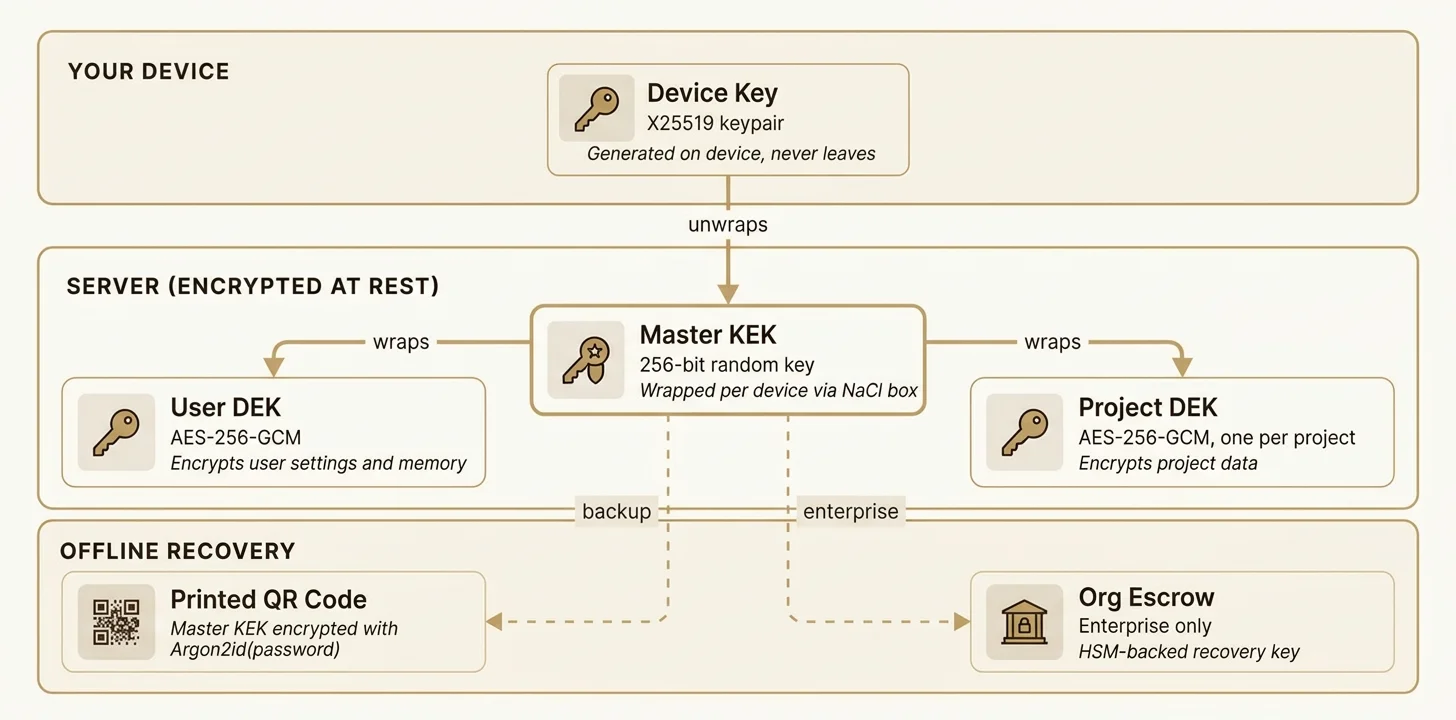
| Key | Algorithm | Generated | Stored |
|---|---|---|---|
| Device Key | X25519 keypair | On device at enrollment | Private: on the device (browser IndexedDB). Public: server (device registry) |
| Master KEK | 256-bit random | At account creation | Server-side, one wrapped copy per enrolled device |
| User DEK | AES-256-GCM | At account creation | Server-side, wrapped by Master KEK |
| Project DEK | AES-256-GCM | At project creation | Server-side, wrapped by Master KEK |
| Recovery Key | Argon2id-derived | At account creation | Printed QR code (offline only) |
| Org Recovery Key | X25519 keypair | At org creation (enterprise) | HSM or admin-managed |
3. Session Lifecycle
- Authentication: user authenticates via WebSocket. Device sends its public key.
- Key unwrap: server retrieves the Master KEK blob wrapped for this device. Device unwraps using its private key, sends plaintext DEKs back over TLS-encrypted WebSocket.
- Session active: DEKs held in a session keyring (in-memory map, per-connection). Hard expiry ceiling of ~4 hours. Each browser tab gets an independent keyring entry.
- Session end: on disconnect, tab close, or expiry — keyring entry is zeroed from memory. Data on disk returns to ciphertext the server cannot open without a session, except an always-on space and legacy workflow stores (§10).
- Server restart: all keyring entries lost. Users must re-authenticate and re-unwrap keys.
4. Threat Model
Protected scenarios
- Data at rest: on stolen or seized server disks, the content of an encrypted account is AES-256-GCM ciphertext. Outside an always-on space and legacy workflow stores (§10), it is unreadable without the user’s device or recovery key. A space needs three factors to open, and a full disk image of the database server holds all three (§10).
- Compromised backups: database backups are encrypted. No plaintext DEKs exist in persistent storage. Backups exclude the key service’s store and root keys, so a backup cannot open an always-on space.
- Insider access: outside an active session, server operators cannot read a user’s content, except an always-on space the user switched on and legacy workflow stores (§10). The backend opens a space only through the key service, for a purpose registered for that space, and every opening is written to the space’s access log. No master key to a user’s account exists. The key service has a root key, which covers only spaces that are switched on (§10).
- Cross-user isolation: per-user databases with per-user DEKs. Compromising one user’s key reveals nothing about other users.
Accepted risk
- Memory-level attack during active session: an attacker with access to server memory during an active session could extract DEKs for currently-connected users. This is inherent to any system where the server processes user data for AI agents. Mitigated by session expiry ceiling (~4 hours), memory zeroing on disconnect, and hardware isolation in enterprise deployments.
5. Device Enrollment and Revocation
First device (account creation)
- Device generates X25519 keypair and random 256-bit Master KEK locally.
- Device wraps Master KEK using NaCl box (device private key + server ephemeral key).
- Device generates User DEK, wraps it with Master KEK.
- Wrapped Master KEK blob, device public key, and wrapped User DEK are sent to the server.
- Server stores wrapped blobs and public key in the device registry.
Subsequent devices
- New device generates its own X25519 keypair.
- Existing device (trust anchor) unwraps Master KEK, re-wraps it for the new device’s public key.
- New wrapped blob stored server-side.
Device revocation
- Revoked device’s session is killed immediately via broadcast.
- New Master KEK is generated. All DEKs (User DEK + all Project DEKs) are re-wrapped with the new Master KEK.
- New Master KEK is wrapped for each remaining enrolled device.
- Revoked device’s wrapped blob is deleted. Its old copy of the Master KEK is now useless (different key).
6. Recovery Tiers
| Tier | Mechanism | Availability |
|---|---|---|
| Multi-anchor | 2+ enrolled devices. Lose one, the other restores access. | All users |
| Printed recovery code | QR code containing Master KEK encrypted with Argon2id(user-chosen password, random salt). Printed and stored offline. | All users |
| Organization escrow | A shared workspace’s WS-DEK additionally wrapped to an organization escrow public key. The escrow private key is generated client-side and persisted only in copies wrapped to org-owner devices — not in an HSM, and never in plaintext on our servers. Scoped to shared workspaces; it does not cover a member’s personal account or Master KEK. | Organizations, opt-in per workspace |
| Total loss | All anchors + recovery code + escrow lost. Data is irrecoverable by design. | N/A |
7. AI Data Protection Pipeline
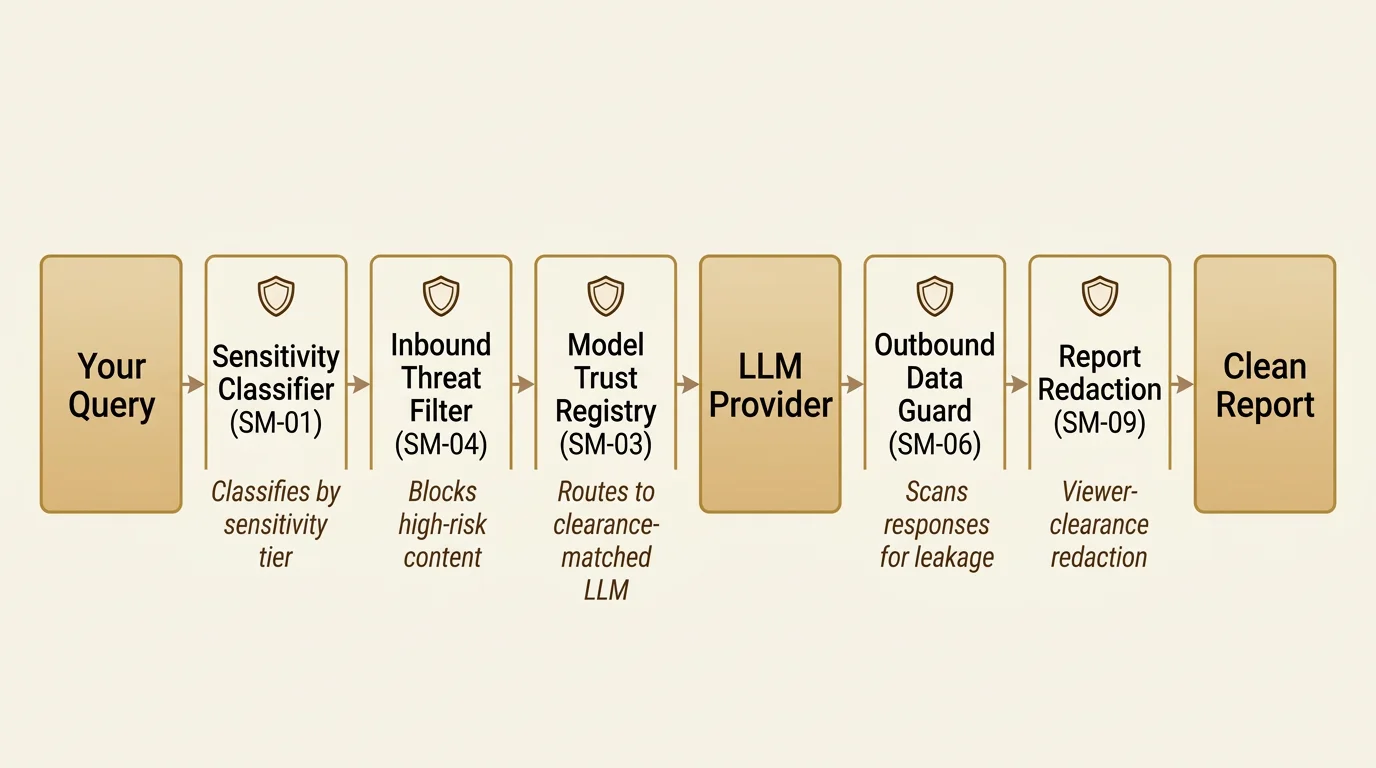
| Layer | Component | Function |
|---|---|---|
| 1. Classification | Data Classification Engine | Classifies content by sensitivity tier (public, internal, confidential, restricted). Detects credentials, PII, proprietary patterns, and custom org-defined rules. |
| 2. Inbound filter | Inbound Threat Filter | Computes a composite risk score for each query. High-risk content is blocked or flagged. Prevents sensitive data from reaching external AI models. |
| 3. Model trust | Model Configuration Registry | Each AI model is assigned a trust tier (local, internal, cloud, external). Queries are routed only to models whose trust tier meets or exceeds the content’s sensitivity clearance. |
| 4. Outbound guard | Outbound Data Guard | Scans AI-generated responses for data leakage — credentials, PII, or patterns that shouldn’t appear in output. Blocks or redacts before delivery. |
| 5. Redaction | Report Redaction Engine | Applies viewer-clearance-based redaction to reports. Content above the viewer’s clearance level is replaced with redaction markers. |
8. Data Isolation Architecture
All user data is stored under an isolated directory: data/<userID>/. No user content exists in shared databases, PostgreSQL, or Redis.
| Database | Contents | Encryption |
|---|---|---|
settings.db | Preferences, chat sessions, project index, model config | User DEK (AES-256-GCM) |
memory.db | Knowledge entities, topics, relationship edges | User DEK (AES-256-GCM) |
projects/<id>/project.db | Research graph nodes, budget state, runtime data | Project DEK (AES-256-GCM) |
PostgreSQL stores only identity data (email, password hash, org membership). Redis stores only ephemeral runtime state (session tokens, rate limits). Neither contains user-generated content.
GDPR deletion: rm -rf data/<userID>/ removes all user data. Because each database is encrypted with the user’s DEK, deletion is final — no residual plaintext exists anywhere in the system. See our EU legal framework guide for the regulatory context.
9. Audit Trail
Security-relevant events are logged to a tamper-evident audit trail:
- Device enrollment and revocation
- Key rotation events
- Session creation and termination
- Inbound filter blocks and outbound guard triggers
- Sensitivity classification decisions
- Model trust tier overrides
10. Always-on spaces
An always-on space is an optional workspace with a single owner. It is off unless the owner switches it on, and switching it on records a versioned acknowledgement. Its purpose is to let the owner’s automations run while the owner is signed out. Notes, tasks, documents and research move into it only from the owner’s Private area, and only by the owner; workflows are bound to it. Everything else about the account keeps the session-locked model above.
Custody
While a space is on, the backend keeps a wrapped key for that one space (wrapped_kek, in PostgreSQL). It opens only with all three of these factors:
| Factor | Where it lives | Backed up |
|---|---|---|
wrapped_kek | PostgreSQL | Yes, with PostgreSQL |
| The per-space secret S | The key service’s (keyd) encrypted store | Never |
| keyd’s root key R | A host file on the database server, outside every volume | Only as two offline copies held by the founder |
keyd mints S on the first wrap of a space and seals it under R. It stores purpose registrations, one row per unwrap, and the backend’s receipts. It never stores the space key itself.
Purposes, rate limit and transport
keyd releases a space key only for a purpose registered for that space. The purpose kinds in use are a workflow run, a connector and a deposit to the Private area; an unregistered purpose is refused. Unwraps are rate-limited per owner and purpose kind (by default 120 an hour, burst 20). The API accepts only TLS 1.3 with a client certificate, and the role in the certificate decides which routes a caller may use.
The access log and the operator alert
keyd commits its unwrap row before it returns a key; if that commit fails, no key is returned. The backend writes the opening to the space’s access log, which the owner reads in Settings and which is kept for 12 months. The backend then posts a receipt to keyd. An unwrap row with no receipt after a grace period (15 minutes by default) is counted, and the count raises a critical alert to our operators. Settings shows the owner whether the log and keyd’s rows agree.
The off switch and its outbox
Switching a space off runs in this order. The space’s off hooks run. One PostgreSQL transaction deletes the backend’s wrap row and queues a keyd delete; from that point no new opening is possible. keyd then deletes the space’s secret S, which is the crypto-shred: every wrapped_kek of that epoch stops opening, in the database, in backups and in disk images. If keyd cannot be reached, the queued delete stays pending and a worker retries it. The app shows the key as being destroyed until keyd confirms, and switching the space on again is refused while a delete is pending. The content stays in the owner’s account, under the session-locked model.
What keyd’s placement protects against today
keyd runs on the database server, not on a machine of its own. Stated exactly: a copy of the application servers cannot open a space, and a copy of the database server’s volumes and environment cannot open one either, because the root key is a host file outside both. A full disk image of the database server can open a space, and a live compromise of that server reaches all three factors. We do not claim a stronger separation than this. Moving keyd to a dedicated machine is planned; until it happens, the limit above is the one that holds.
Retention
| Record | Kept |
|---|---|
| Access log entries | 12 months |
| Run records of the space’s workflows | 90 days after the run ends; removed at that workflow’s next run after that |
| Resolved requests from the space to the owner | 90 days |
| Deposits from the space to the Private area, not yet delivered | 30 days, then deleted |
Workspace snapshots and legal holds are refused for an always-on space.
Isolation
A workflow in the space runs only inside the space, and a pre-flight allowlist decides which steps it may contain. The platform actions allowed read only the space, call the model, or seal a deposit into the owner’s Private area. API-call and connector steps are allowed, so an automation the owner builds can send space data to a service the owner chooses. The space limits what reaches it; it does not stop the owner’s own automation from sending data out.
Compelled access
A court can order us to open an always-on space. While the owner is signed out, the rest of their encrypted account’s content is closed to us: we hold no key to it, apart from the legacy workflow data below. If we are ever made to open a space, we record it in that space’s access log, unless the law forbids us to.
Legacy remainder
Workflow data created before our October 2026 custody change moves under your own key the next time you sign in; until then our servers can still open it.
Companion documents
- The consumer-facing Security overview summarises this whitepaper for a non-technical audience.
- The Multi-Backend Architecture with Layered Post-Quantum Encryption whitepaper extends the model documented here to a horizontally-scaled deployment and the hybrid post-quantum envelope that protects against future cryptanalytic attack.
Sources
-
An always-on space is optional, has a single owner, and is off unless the user switches it on with a recorded acknowledgement. While it is on, LumaVista's servers keep a wrapped key for that one space and can open it, through a separate key service and only for purposes registered for that space, to run the user's automations while the user is signed out. Each opening is written to the space's access log, which the owner can read and which is kept for 12 months. Switching the space off prevents any new opening at once and destroys the service's key for it; the content stays in the user's account. Other workflow data created before LumaVista's October 2026 custody change can still be opened by the servers until its owner next signs in.
LumaVista AI — Security: always-on spaces (server-held wrapped key for one opt-in space, opened through a separate key service for registered purposes, every opening logged) -
The account key is generated on the user's own device; LumaVista AI keeps no copy of it and holds no escrow of its own, so it cannot open the content of a locked, encrypted account; the exception is an always-on space the user chooses to switch on, for which LumaVista's servers keep a wrapped key so they can open that one space to run the user's automations, and every opening is written to that space's access log. An organisation may optionally enable escrow on a shared team workspace so that its own owners can recover that workspace's key; the escrow private key is generated in the browser and stored only in copies wrapped to those owners' devices, and it does not cover a member's personal account. Workflow data created before LumaVista's October 2026 custody change moves under the user's own key the next time they sign in; until then LumaVista's servers can still open it.
LumaVista AI — device-held encryption keys, generated on your device; no provider-held escrow, optional org-owner-held escrow on shared workspaces -
The account key is generated on the user's device and LumaVista AI keeps no copy of it and holds no escrow of its own; the content of an encrypted account is encrypted at rest under keys the provider does not hold, except an always-on space the user chooses to switch on, for which LumaVista's servers keep a wrapped key so they can open that one space to run the user's automations, with every opening written to that space's access log. While a session is unlocked the service does process content in order to research, ground chat, index and embed it. Shared team workspaces may optionally enable an organisation escrow so that the organisation's own owners can recover a workspace key; that escrow's private key is held on those owners' devices, not by the provider. Workflow data created before LumaVista's October 2026 custody change moves under the user's own key the next time they sign in; until then LumaVista's servers can still open it.
LumaVista AI — device-generated keys, no provider-held escrow (org escrow on shared workspaces is org-owner-held), no provider-held copy; session-locked architecture processes plaintext while unlocked