The DRAG Framework — Stop Doing Work AI Should Handle
By LumaVista Team


You just spent 45 minutes perfecting the font choices on an internal slide deck. The presentation will be seen for six minutes in a meeting that could’ve been an email. And here’s the kicker — your brain rewarded you for it. The same little dopamine hit you’d get from closing a deal or nailing a product launch? You got it from picking between Helvetica and Inter.
This is called completion bias. Your brain is wired to chase the satisfaction of finishing tasks, and it doesn’t care which ones. Redrafting an internal email feels just as rewarding as writing a million-dollar strategy document. Everything becomes priority one. So nothing is.
CEOs aren’t immune either. In a Harvard Business Review survey, 71% of senior managers said their meetings are unproductive and inefficient. We all know those meetings — the hour-long session that needed 15 minutes to reach a decision.
So how do you break out of this trap? You need a way to sort what deserves your best thinking from what just needs to get done. That’s exactly what the DRAG framework does.
Two curves that change how you think about work
Here’s a mental model that shifts everything, originally laid out by theMITmonk in his breakdown of how the top 1% actually use AI.
Picture two curves.

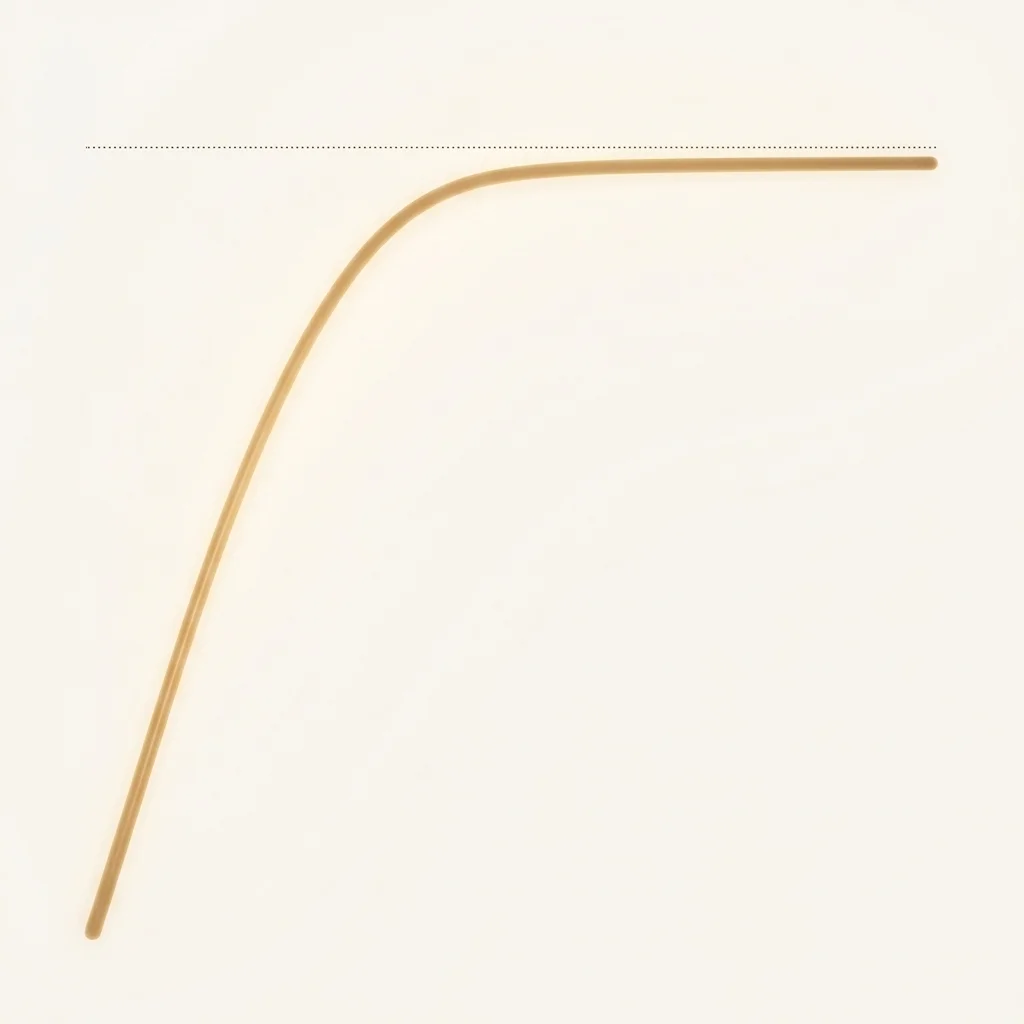 The first curve has a ceiling. It rises quickly, then flatlines. These are tasks with capped payoff — formatting slides, writing internal emails, filling out expense reports, attending FYI meetings. Spending extra effort here doesn't unlock extra value. Nobody's going to notice your breathtaking slide transitions. The value tops out fast.

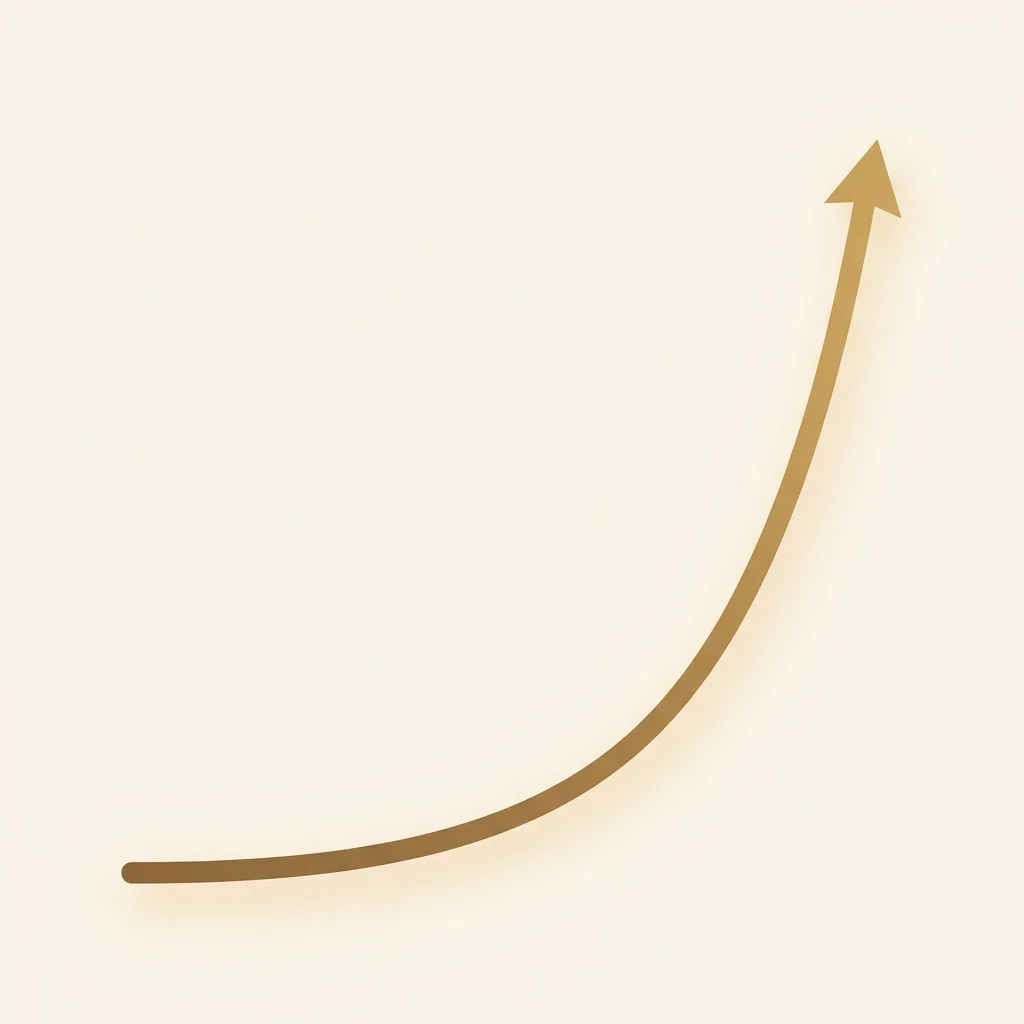 The second curve has no ceiling. It stays flat for a long time, then rockets upward. These are tasks with uncapped payoff — customer interactions, product design, pricing strategy, finding the right co-founder. Being 1% better at these doesn't give you 1% better results. It solves 99% of your remaining problems.
Nobel Prize-winning economist Herbert Simon had a word for what you should do with the first curve: satisficing. It’s a mashup of “satisfy” and “suffice” — stop when the outcome is good enough. Don’t chase perfection on tasks where perfection doesn’t pay.
Steve Jobs famously insisted that the circuit board inside the original Macintosh look beautiful — parts no customer would ever see. He even had the engineers’ signatures engraved on the inside of the case. But he knew that was a second-curve task. The invisible architecture shaped everything visible. He wasn’t wasting time. He was investing in the curve that had no ceiling.
If the first curve is your zone of intelligent laziness, the second curve is your zone of obsession.
Your brain rewards you equally for perfecting a slide deck and closing a deal. Completion bias doesn’t distinguish between capped and uncapped payoff.
The question becomes: how do you spend less time on curve one so you can pour yourself into curve two?

Enter the DRAG framework
The DRAG framework, as outlined by theMITmonk, gives you four categories of work to hand off to AI immediately. Each one frees up time and mental energy for the tasks that actually compound.
D — Drafting
This is the blank page problem. Getting from zero to one is the hardest part of any creative task. You sit there staring at an empty document, cursor blinking, and nothing comes out. Writers call it writer’s block. Developers call it analysis paralysis. Executives call it “I’ll get to it after lunch.” Whatever the name, the result is the same — you burn your best mental energy just trying to start.
AI is surprisingly good at solving this. Give it context about what you need — the role, the input, the goal — and let it produce a first draft. Will that draft be perfect? Absolutely not. It’ll probably be mediocre at best. But that’s the point. You’re not asking AI to do the thinking. You’re asking it to give you something to react to.
Once you have a starting point, something clicks. Your brain stops freezing and starts editing, rearranging, and adding the insights only you can bring. The blank page was the bottleneck, and AI just removed it.
R — Research
Information overload is real. When a project requires deep research — competitive analysis, market sizing, summarizing a stack of papers — you can burn days just gathering and organizing information before you even start thinking about it.
AI-powered deep research tools fire off hundreds of search queries, crawl the web, consolidate findings, cross-check for gaps, and deliver structured summaries. What used to take a week of consultant time now takes ten minutes. You still need to evaluate the output and think critically about what it means, but the grunt work of collection and synthesis? That’s firmly in zone one.
A — Analysis
Unstructured data is where AI really shines. Throw it a pile of customer feedback, financial reports, or meeting transcripts, and it’ll find patterns you’d miss — or at least miss on the first three passes. Summarization, sentiment analysis, trend detection, anomaly flagging — these are zone-one tasks that eat hours when done manually.
The key word here is “first pass.” AI gives you the 80% view fast. Your job is the remaining 20% — the judgment calls about what the patterns actually mean and what to do about them.
G — Grunt work
This is the most obvious category, and somehow people still do it manually. Reformatting documents. Translating content. Cleaning messy spreadsheets. Converting data between formats. Tabulating survey responses. Writing boilerplate code.
These tasks have zero creative upside. They need to get done, and they need to be accurate, but they don’t benefit from your unique insight or judgment. They’re pure zone-one work. And they add up fast — most knowledge workers lose five to ten hours a week on tasks that could be fully automated with the right prompt.

Most knowledge workers lose five to ten hours a week on tasks with zero creative upside. That time compounds when redirected to zone two.
The key principle: know which zone you’re in
Here’s where most people get the DRAG framework wrong. They hear “delegate to AI” and start outsourcing everything — including the work that matters most.
DRAG applies only to zone one. Only to the first curve. If a task involves human judgment, relationship building, creative taste, ethical decision-making, or strategic intuition, that’s zone two. That stays with you. AI can’t replicate the instinct that tells you which customer concern is really about trust, not features. It can’t feel the room in a negotiation. It doesn’t have taste.
theMITmonk puts it simply: 70 to 80% of repetitive tasks tend to be zone one. That’s a massive amount of time you can reclaim. But the remaining 20 to 30%? That’s where you pour your soul.
Be lazy when you can DRAG. Be obsessed for everything else.
AI is a probability engine, not a calculator
One thing theMITmonk emphasizes that’s worth calling out separately: AI isn’t deterministic. Ask the same question twice and you’ll get two different answers. It’ll confidently make things up if you don’t give it guardrails. This matters for the DRAG framework because it changes how you delegate.
You don’t just throw tasks over the wall and trust whatever comes back. You delegate the heavy lifting — the first draft, the initial research sweep, the data cleanup — and then you apply your judgment to the output. AI handles the volume. You handle the quality. That division is what makes zone-one delegation work without creating new problems.
What this looks like in practice
When you map the DRAG framework to how AI tools actually work, a pattern emerges. The best tools don’t just handle one category — they cover the full spectrum of zone-one work.
Take LumaVista’s approach: its research agents handle the R, running deep multi-source investigation across the web. Document analysis covers the A, pulling patterns from your unstructured files. Workflow automation handles the G, taking care of the repetitive formatting and data work. And the chat and reporting features handle D, giving you structured starting points for any project.
The point isn’t which tool you use. It’s that you recognize the pattern: every hour you spend on zone-one work is an hour stolen from zone two. The right tools don’t just save time — they redirect your attention to where it compounds.

AI handles the volume. You handle the quality. That division is what makes delegation work without creating new problems.
What to do now
-
Audit your last week. Look at your calendar and task list. Tag each item as “zone one” (capped payoff) or “zone two” (uncapped payoff). Most people discover 60-80% of their time went to zone one.
-
Pick three zone-one tasks to DRAG. Choose one from each category — a draft you’ve been putting off, a research task you’ve been doing manually, and a grunt work chore you repeat weekly. Delegate each to AI this week.
-
Stop perfecting the capped. Next time you catch yourself wordsmithing an internal email or tweaking slide formatting, ask: “Is this a first-curve task?” If yes, satisfice. Get it to good enough and move on.
-
Protect zone-two time. Block two hours on your calendar this week that are exclusively for uncapped-payoff work. No email. No admin. Just the work that compounds.
-
Track the shift. After two weeks of applying DRAG, redo the audit from step one. Compare how much time moved from zone one to zone two. The delta is your productivity gain — and more importantly, it’s your impact gain.
-
Watch the source. theMITmonk’s full video, Give Me 18 Minutes and I’ll Make You Dangerously Smart (with AI), covers the DRAG framework plus three more steps for getting elite results from AI. It’s worth the 18 minutes.